

A network system installation is the process of setting up a computer network. This network allows computers and devices to connect and share information. Many homes, schools, and offices use networks every day. But what does installing a network system really mean? Let’s find out.
Understanding a Network
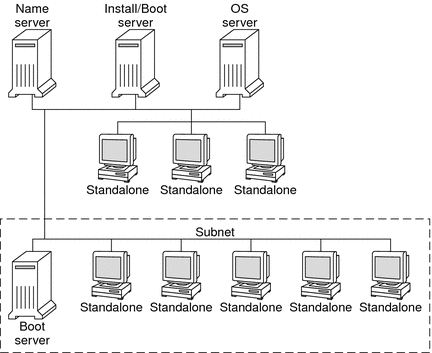
A network is a group of computers and devices linked together. They can talk to each other and share files, internet, and printers. Networks can be small or large. For example:
- At home, your computer and phone connect to the internet using Wi-Fi.
- At school, many computers connect to one server to share resources.
- In an office, workers use a network to send emails and store files.
Without a network, devices work alone. But with a network, they work as a team.
What Does Network System Installation Include?
Network system installation means putting all the parts in place so the network works well. This includes many steps and different equipment.
1. Planning The Network
First, experts plan how the network will look. They decide:
- How many devices will connect.
- What kind of network is needed (wired or wireless).
- Where to place cables and devices.
- How to keep the network safe.
Good planning helps avoid problems later.
2. Installing Cables And Hardware
Next, the physical parts go in place. This step includes:
- Running network cables through walls or floors.
- Setting up routers, switches, and modems.
- Connecting computers, printers, and other devices.
Cables are like roads. They carry information between devices.
3. Setting Up Network Devices
After hardware is ready, devices need to be set up. This means:
- Configuring routers to connect to the internet.
- Setting IP addresses for each device.
- Creating Wi-Fi networks for wireless devices.
- Making sure devices can find each other.
These steps make the network work smoothly.
4. Testing The Network
Once installed, the network must be tested. This checks:
- Can devices connect to the internet?
- Can devices share files and printers?
- Is the network speed good?
- Is the network safe from hackers?
Testing helps fix problems before use.
5. Training And Support
After installation, users may need help to use the network. Support may include:
- Showing how to connect devices.
- Explaining how to use shared resources.
- Helping with passwords and security.
Good support keeps the network running well.
Types of Network Systems
Networks are not all the same. They come in different types:
| Network Type | Description | Where Used |
|---|---|---|
| LAN (Local Area Network) | Connects devices in a small area, like a home or office. | Homes, small offices |
| WAN (Wide Area Network) | Connects devices over large distances, like cities or countries. | Large companies, the internet |
| Wireless Network | Uses Wi-Fi to connect devices without cables. | Homes, cafes, public places |
| VPN (Virtual Private Network) | Creates a safe network over the internet. | Businesses, remote workers |
Why is Network System Installation Important?
Installing a network system is very important. It helps:
- Connect many devices easily.
- Share resources like printers and files.
- Provide internet access to all users.
- Improve communication between people.
- Keep data safe with security settings.
Without proper installation, networks can be slow or unsafe.
Common Equipment Used in Network System Installation
Many tools and devices are needed. Here are the common ones:
- Router: Sends data between devices and the internet.
- Switch: Connects many devices inside a network.
- Modem: Connects the network to the internet service.
- Network Cables: Carry data between devices (like Ethernet cables).
- Access Point: Extends Wi-Fi coverage.
- Firewall: Protects the network from outside attacks.
Steps to Prepare for Network Installation
Before installing, you need to prepare. Follow these easy steps:
- Decide how many devices will use the network.
- Choose wired, wireless, or both types.
- Plan where devices and cables will go.
- Buy the right equipment for your needs.
- Check internet service availability and speed.
Preparation helps make installation smooth and fast.
Who Does Network System Installation?
Network installation is done by skilled people. They are called network technicians or engineers. These experts know how to set up devices and cables. They also make sure the network is safe and fast. Sometimes, people do simple setups themselves at home. But big networks need professionals.

Credit: www.teeletrik.com
How Long Does Network Installation Take?
The time depends on the network size. Small home networks take a few hours. Large office networks may take several days. It also depends on:
- Number of devices to connect.
- Type of network (wired or wireless).
- Complexity of setup and security.
Planning well helps finish installation on time.
Tips for a Good Network Installation
Keep these tips in mind for a smooth installation:
- Use good quality cables and devices.
- Label cables to avoid confusion later.
- Place routers where Wi-Fi reaches all areas.
- Secure your network with strong passwords.
- Test the network before full use.
- Keep a backup plan in case problems happen.
Credit: docs.oracle.com
Frequently Asked Questions
What Is Network System Installation In Simple Terms?
Network system installation means setting up hardware and software to connect computers. It allows devices to share data and resources smoothly. This setup helps businesses and homes communicate easily.
Why Is Network System Installation Important For Businesses?
A good network system ensures fast and secure data sharing. It improves team communication and boosts work efficiency. Without it, businesses may face delays and security risks.
How Long Does A Typical Network System Installation Take?
Installation time varies by network size and complexity. Small setups may take a few hours, while larger ones take days. Planning and testing also affect the total time needed.
Conclusion
Network system installation connects many devices to work together. It takes planning, equipment, and careful setup. A well-installed network helps share information and resources easily. Whether for home, school, or office, a network makes life better. If you need help with network installation, contact experts who know the job. A good network system keeps you connected and safe.
For professional network installation services, call +65 80536303.