

Many people ask, “Can I move my fiber router?” The short answer is yes. But there are some important things to know first. Moving your fiber router is possible, but it must be done carefully. This article will explain how and what to check before moving your router.
What Is a Fiber Router?
A fiber router is a device that connects your home to the internet using fiber optic cables. These cables carry data very fast using light signals. Fiber internet gives you fast and stable internet connections.
The fiber router helps your devices connect to this fast internet. It changes the light signals from the fiber cable into Wi-Fi or wired internet for your computers, phones, and TVs.

Credit: www.reddit.com
Why Would You Want to Move Your Fiber Router?
People move their fiber routers for many reasons. Some want better Wi-Fi signals in different rooms. Others may want a cleaner look or more space. Sometimes, people move furniture or change rooms and want the router in a better spot.
Good Wi-Fi coverage depends on where the router is. If your Wi-Fi is weak or slow in some rooms, moving the router can help.
Can You Move Your Fiber Router Anywhere?
Not exactly. You cannot just place the router anywhere. The fiber router must stay near the fiber optic cable connection point. This point is where the fiber cable enters your home.
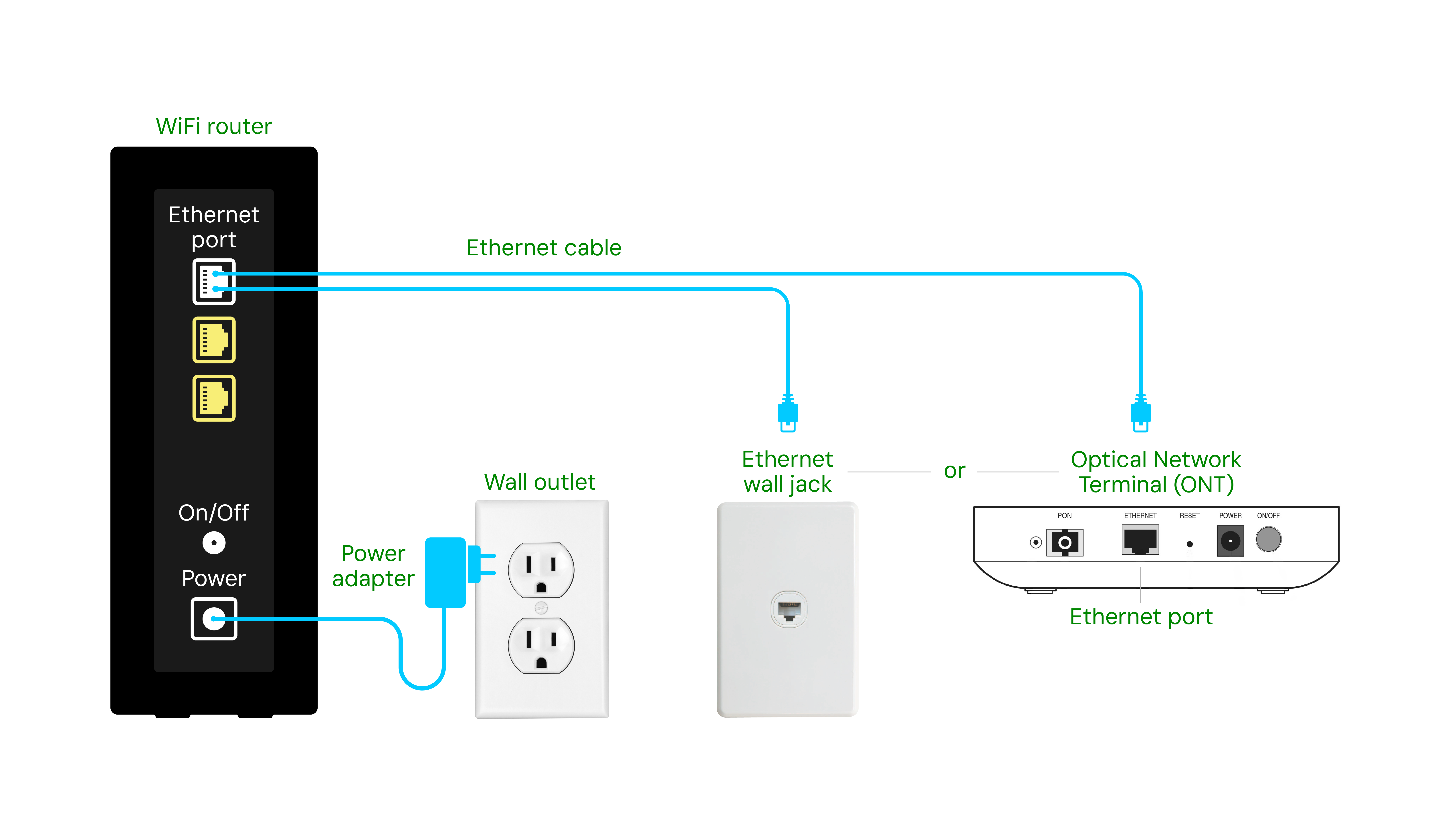
This connection is called the Optical Network Terminal (ONT) or sometimes the fiber termination box. The fiber router needs to connect directly to this box by a special cable.
So, the fiber router can only move as far as the cable allows. If you want to move it far away, you need to extend the cable or use special equipment.
Steps to Move Your Fiber Router
Follow these simple steps to move your fiber router safely.
- Find the Fiber Box (ONT): Locate where the fiber cable enters your home. This is usually on a wall near the main internet line.
- Check the Cable Length: See how long the fiber cable is from the box to the router. The router can only be moved as far as this cable reaches.
- Plan the New Location: Choose a spot where the cable can reach, and the Wi-Fi signal will be better.
- Disconnect Carefully: Unplug the fiber cable and power from the router. Do not pull hard on the fiber cable. It is fragile.
- Move the Router: Place the router in the new location and connect the fiber cable and power again.
- Test the Connection: Turn on the router and check if the internet works well in the new spot.
What If the Cable Is Too Short?
If the fiber cable is too short, you have two options:
- Ask Your Internet Provider: They can install a longer fiber cable or move the fiber box.
- Use Network Equipment: You can use devices like Wi-Fi extenders or mesh Wi-Fi systems to improve coverage without moving the router far.
Do not try to extend the fiber cable yourself. Fiber cables are delicate. Incorrect handling can cause damage or loss of internet.
Tips for Good Router Placement
Where you place your router affects your internet speed and Wi-Fi quality. Here are some easy tips:
- Place the router in a central spot in your home.
- Keep it away from thick walls or metal objects.
- Put it higher, like on a shelf, for better coverage.
- Avoid placing it near microwaves or cordless phones that cause interference.
- Keep it in an open space, not inside a cabinet or box.
Does Moving the Router Affect Internet Speed?
Moving the fiber router itself does not change the internet speed. But where you place it can change Wi-Fi speed and signal strength.
If the router is in a good spot, your devices get better signals. This means faster internet without interruptions.
Can I Move My Fiber Router Without Help?
Yes, you can move it yourself if the cable is long enough. Be careful when unplugging and moving the router.
If you want to change the fiber cable or move the fiber box, ask your internet provider. They have trained technicians to help.
Common Problems When Moving a Fiber Router
Sometimes, issues may happen when moving your fiber router:
- No Internet After Moving: Check if the fiber cable is plugged in properly.
- Weak Wi-Fi Signal: Try a better location or use Wi-Fi extenders.
- Fiber Cable Damage: Do not bend or pull the fiber cable hard. It can break easily.
If you have any problems, contact your internet provider for support.
Credit: ziplyfiber.com
Summary Table: Moving Your Fiber Router
| Step | What to Do | Important Notes |
|---|---|---|
| Locate Fiber Box | Find where the fiber cable enters your home | Router must connect here |
| Check Cable Length | Measure the cable from box to router | Router can only move within this length |
| Choose New Spot | Pick a place with better Wi-Fi coverage | Keep cable length in mind |
| Disconnect Router | Unplug fiber cable and power carefully | Do not bend or pull cable hard |
| Move and Connect | Place router and plug cables again | Check for secure connections |
| Test Internet | Turn on router and test Wi-Fi | Contact provider if no internet |
Contact Your Internet Provider for Help
If you feel unsure about moving your fiber router, ask for help. Your internet provider can guide you or send a technician. They know how to handle fiber cables safely.
You can call customer support at +65 80536303 for assistance.
Final Thoughts
Yes, you can move your fiber router. But keep it near the fiber box. Handle the fiber cable carefully. Choose a good spot for better Wi-Fi.
If you need a longer cable or big changes, ask your internet provider. Good router placement can improve your internet experience.
Remember, the fiber cable is delicate. Do not try to fix or extend it yourself. Stay safe and enjoy faster, better internet at home.
Frequently Asked Questions
Can I Move My Fiber Router To Another Room?
Yes, you can move your fiber router to another room. Make sure the fiber cable reaches the new spot and avoid sharp bends. Check signal strength after moving for the best performance.
Will Moving My Fiber Router Affect Internet Speed?
Moving your fiber router might change your internet speed. Distance from the fiber terminal and obstacles like walls can lower speed. Place the router in an open area for better coverage.
Do I Need A Technician To Move My Fiber Router?
A technician is usually not needed if you only move the router within your home. But if you need to extend fiber cables or move the fiber terminal, call a professional. Proper handling prevents connection issues.